An AI copilot that helps bank data engineers untangle a billion-row merger — investigating issues, reconciling accounts, and migrating legacy code without ever leaving the flow.
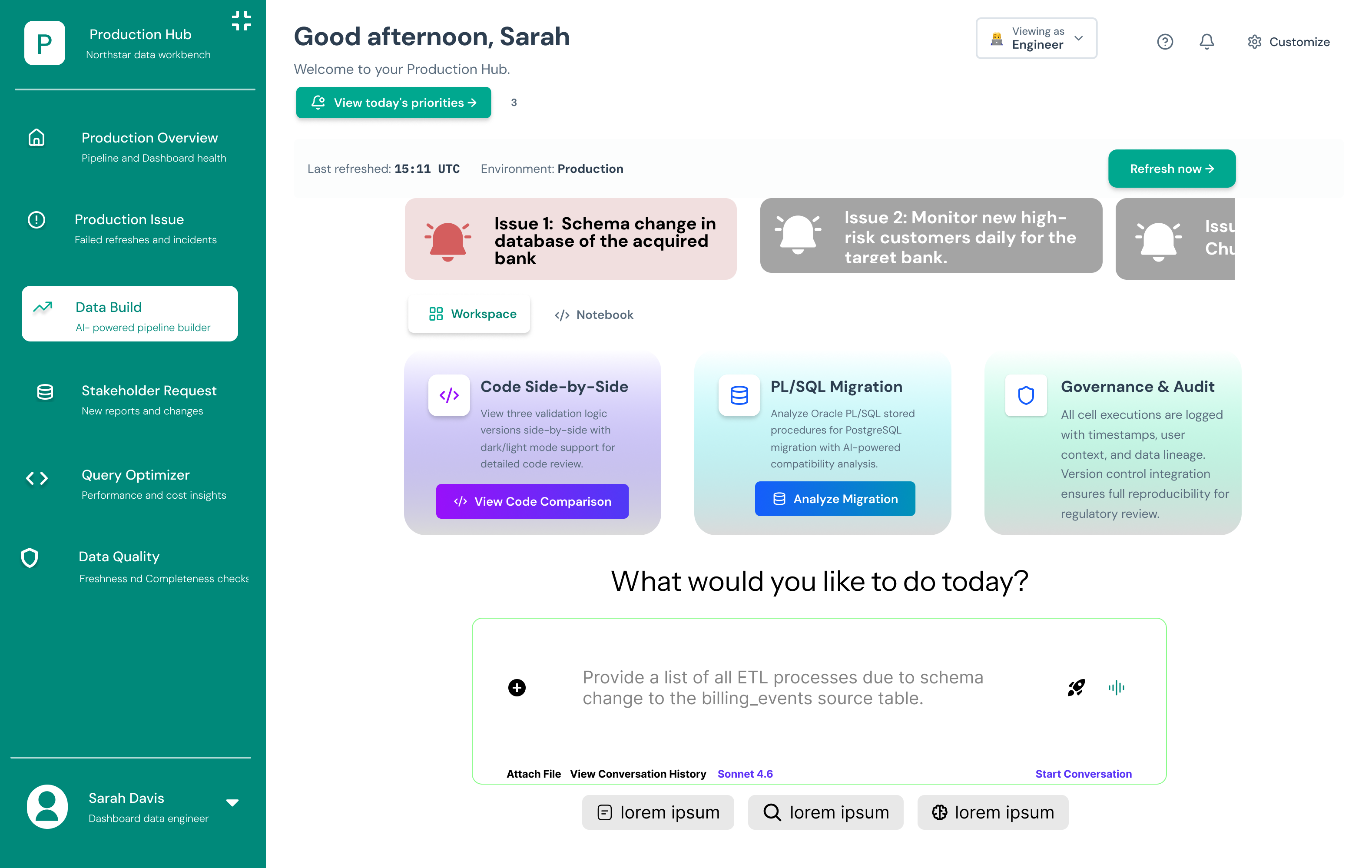
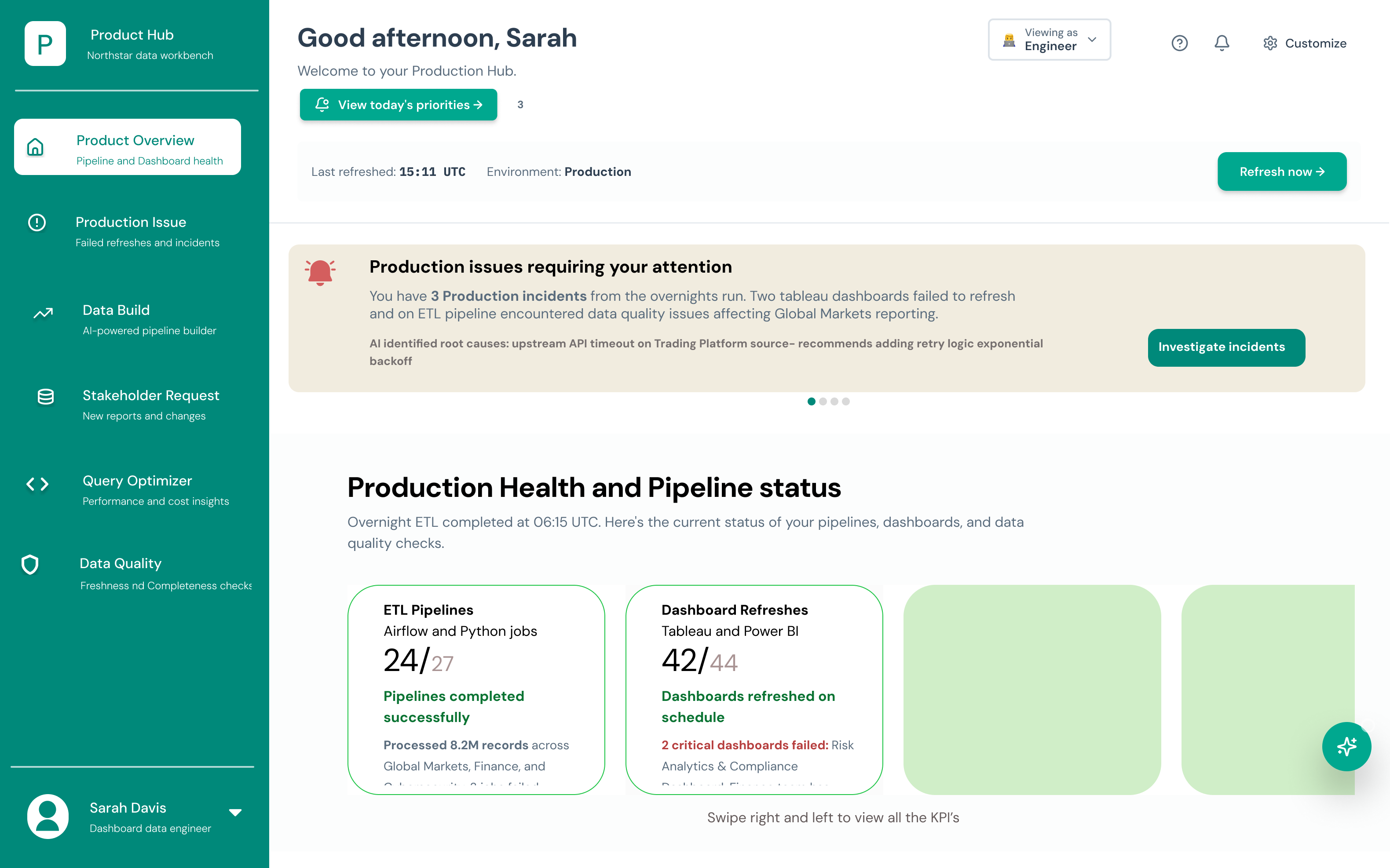
The Production Hub — an engineer's morning starts here, not in six different tabs.
When two banks merge, their data doesn't. I designed a workbench that lets a data engineer talk to their data, watch AI agents do the reconciliation grunt-work, and trust every answer because it shows its sources.
A proof-of-concept to show how AI could collapse a fractured post-merger data workflow into a single, calm surface.
An agentic data workbench: production hub, conversational pipeline builder, multi-agent analysis, and traceable Q&A.
It turns hours of cross-platform swiveling into a conversation — and makes the AI's reasoning auditable enough for a bank.
A Business Transformation team has just acquired another bank. Now millions of client records, accounts, and products from two completely different systems have to become one source of truth — without breaking a single balance.
The data engineers carrying that load were doing it with spreadsheets, swivel-chair tooling, and zero visibility into why things broke.
processed across Global Markets, Finance & Compliance every overnight run — where one renamed column quietly breaks 14 downstream pipelines.
Engineers jumped between the platform and third-party tools just to map one account structure to another.
Matching duplicate clients and reconciling balances was hand-done — slow, error-prone, and impossible to audit.
When a dashboard failed to refresh, root cause was a guessing game. In a regulated bank, that's a compliance risk.
Sarah doesn't need another dashboard — she needs the system to tell her what changed, why it broke, and what to do next, in language she can act on. Every tool that asks her to leave her workflow to find that out is a tool that's slowing the migration down.
So I designed around three questions she asks every single morning:
The hard part of an AI tool for a bank isn't making it smart. It's making it trustworthy and calm. These were my guardrails.
Abstract away the pipelines and PL/SQL — but always let the engineer see and override what the AI did.
If Sarah can describe it in plain English, she shouldn't have to build it in a form.
Let specialized agents reconcile, validate and pattern-match — the human makes the call.
No black boxes. Each insight cites the tables, queries and docs behind it — auditable by default.
I didn't start in Figma — I started with sticky notes, sketches and a lot of "wait, why does she even open this screen?" Here's how the workbench actually came together, the detours included.
Before pixels, I sketched the three screens Sarah lives in. Paper let me throw away bad ideas in minutes — like an early version that buried incidents two clicks deep.
Data-dense screens punish weak hierarchy. I built a tight modular scale (1.25 ratio) in two type roles — Space Grotesk for everything human-facing, Space Mono for data, IDs and code — so Sarah can scan a screen in one pass.
Before hi-fi, I ran a heuristic evaluation on the wireframes. Three findings changed the design — here's what I caught and how I fixed it.
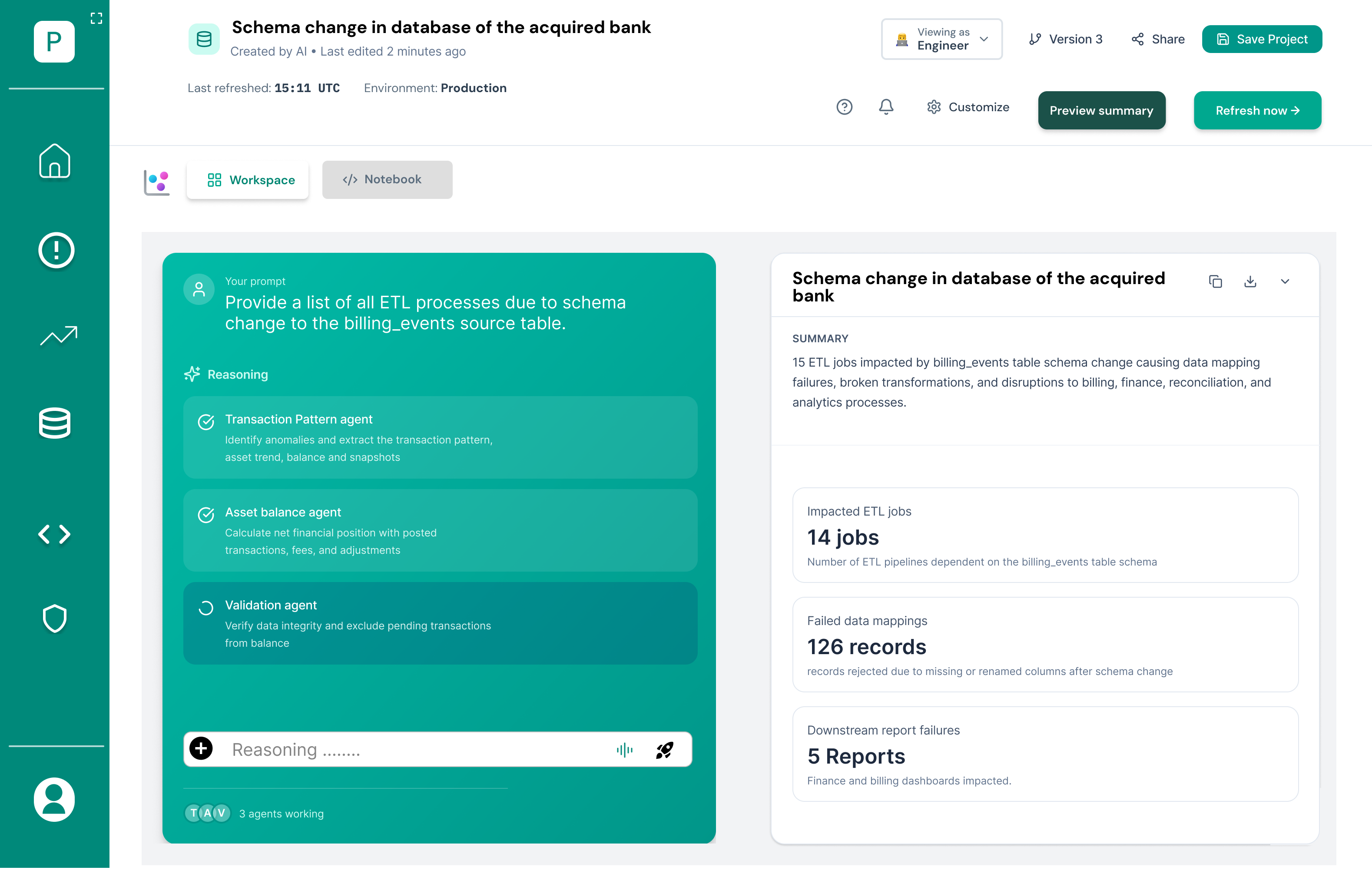
The AI agents ran silently — Sarah couldn't tell if it was working or stuck.
→ Added live streaming reasoning + per-agent status so progress is always visible.
Early labels used internal system jargon ("ETL DAG node").
→ Rewrote in an engineer's language — "pipelines," "runs," "affected reports."
A migration could be run with zero confirmation — risky on a billion rows.
→ Added a compatibility review + diff step before any conversion executes.
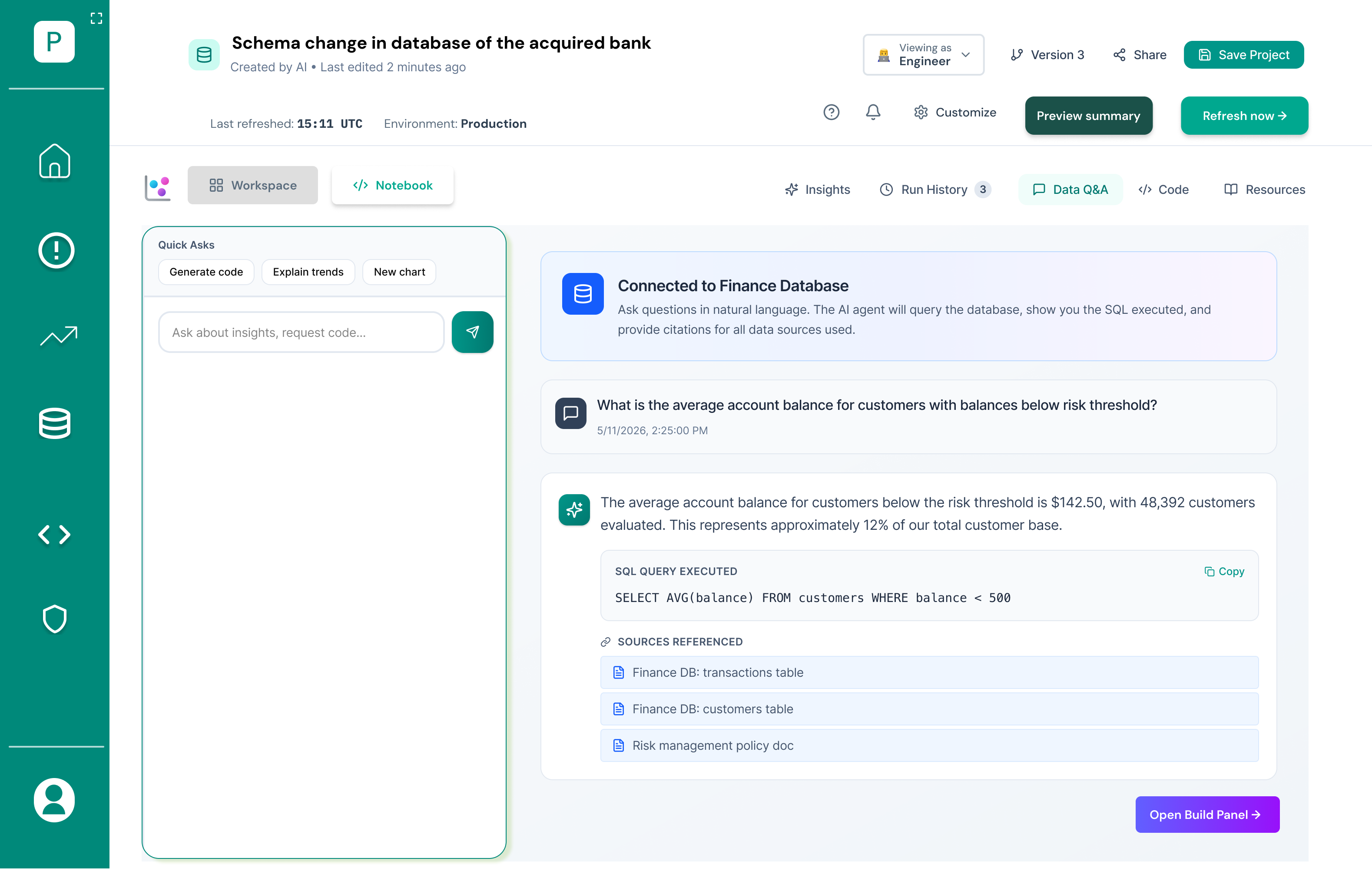
"Recognition rather than recall" — users shouldn't have to remember sources.
→ Every answer shows its SQL + cited tables inline, not in a hidden log.
A data workbench can drown you in elements. Here's the real Production Hub — and the five Gestalt principles working underneath it to keep a dense screen calm and scannable.
2
5
3
1
4
6
Each KPI card keeps its title, the 24/27 count and its status note tight together — so a card reads as one fact, not four scattered numbers.
The teal sidebar fences all navigation inside one shared field — Sarah instantly knows "this is where I move," separate from the work canvas.
The beige "issues requiring your attention" banner lifts off the white page, pushing the most urgent thing into the foreground.
The health cards share one identical layout, so the eye treats them as the same kind of thing and compares them at a glance.
Teal is rationed. It only marks actions — "View today's priorities," "Refresh now" — so the primary move is never ambiguous.
A single left-aligned edge runs greeting → priorities → alert → health, giving a calm top-down reading line through the whole screen.
Rather than a feature tour, I designed the product as a narrative — the path from "something's wrong" to "it's handled, and I can prove it."
The Production Hub greets Sarah with exactly what needs her: incidents triaged by AI, pipeline health, and a root-cause hypothesis already drafted — before she's finished her coffee.
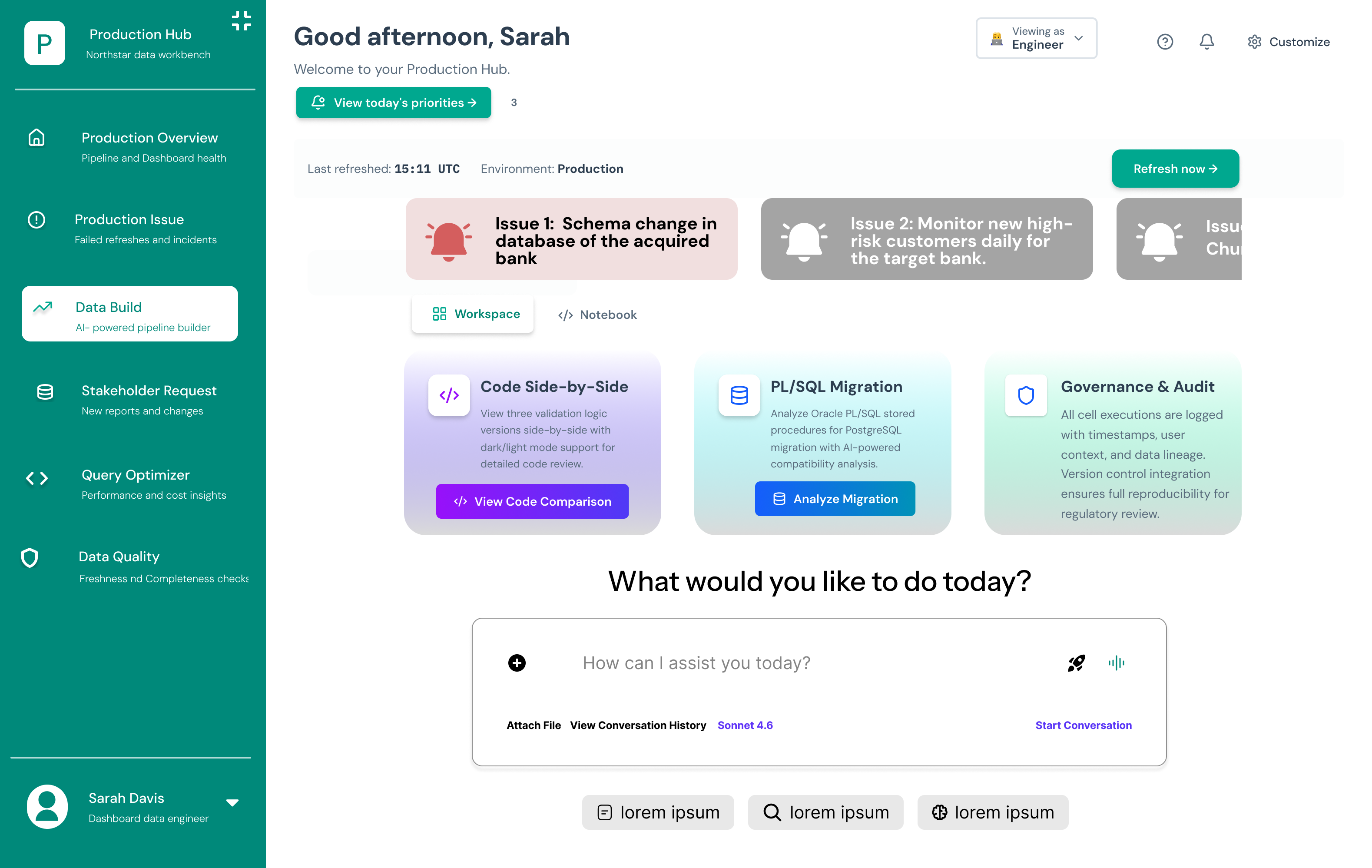
Instead of wiring a pipeline, Sarah types "list every ETL process affected by the schema change to billing_events." The workbench turns intent into action — and surfaces ready-made paths like code comparison and PL/SQL migration.
Three specialized agents — Transaction Pattern, Asset Balance, Validation — work the problem in parallel, streaming their reasoning on the left and a structured summary on the right. The AI does the reconciliation; Sarah stays the decision-maker.
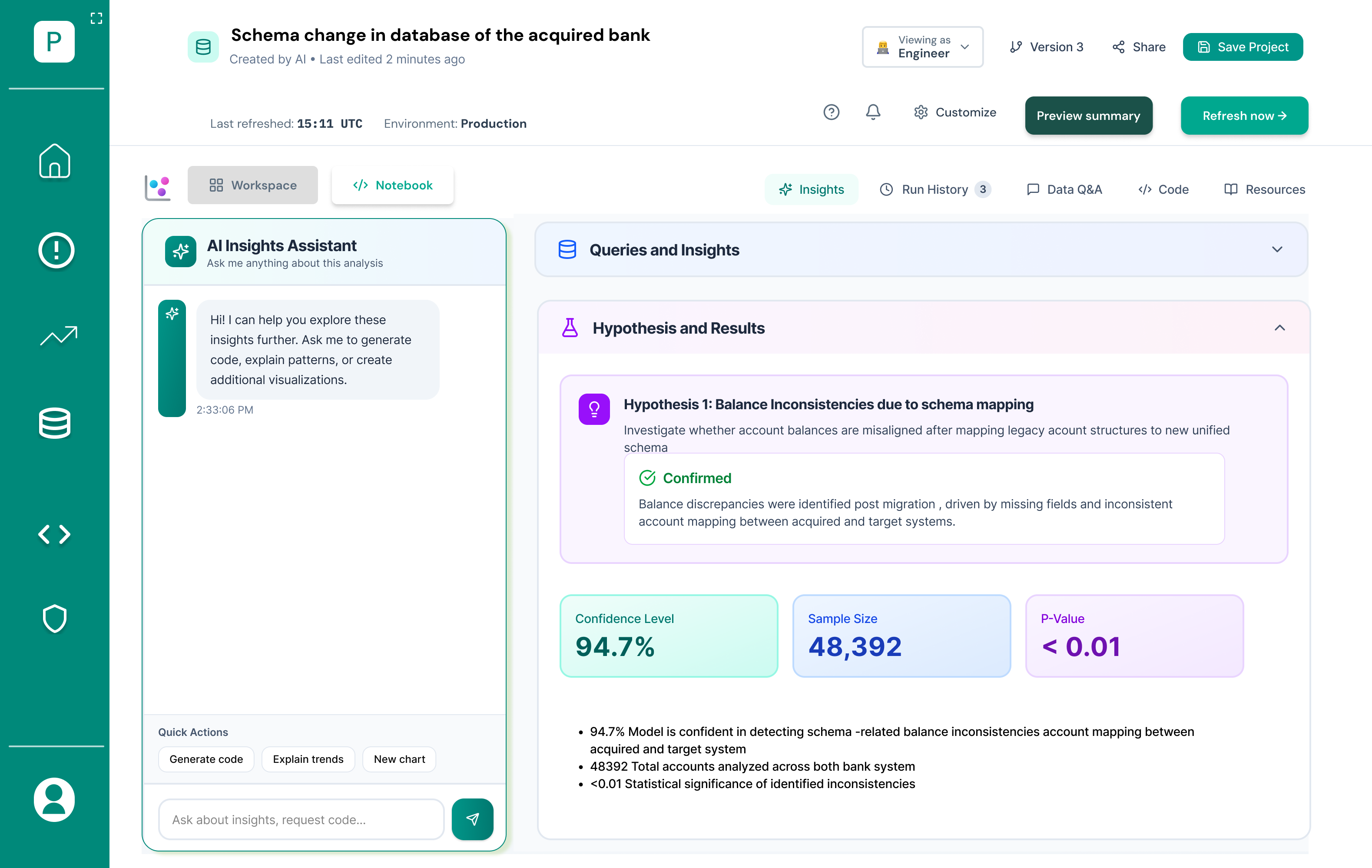
Findings come as hypotheses with confidence levels, sample sizes and p-values — the language a bank actually trusts. "Balances are misaligned after schema mapping" becomes a confirmed, measurable claim.
Sarah asks a question in natural language; the workbench shows the exact SQL it ran and the sources it pulled from. Nothing is a black box — which is what makes an AI usable inside a regulated bank.
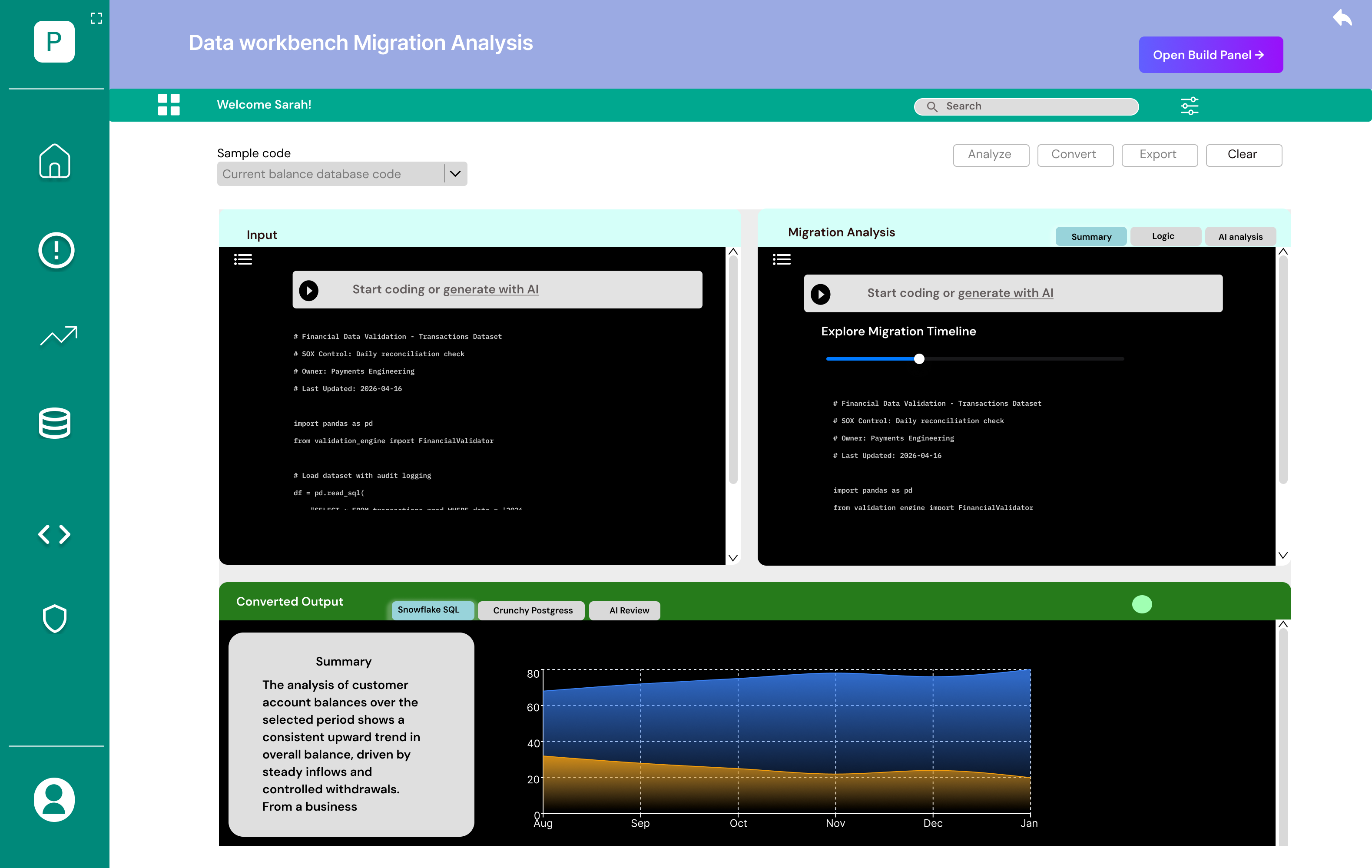
A side-by-side migration view converts Oracle PL/SQL to Snowflake or Postgres with an AI compatibility review and a timeline scrubber — so years of legacy logic don't have to be rewritten by hand.
As a proof-of-concept, success wasn't a shipped metric — it was conviction. The prototype gave stakeholders a tangible vision of an AI-native workbench worth investing in.
Collapsed incident triage, pipeline building, analysis, Q&A and migration into a single workbench instead of six tabs.
Every AI output carries its SQL, sources and reasoning — clearing the bar for a regulated environment.
A walkthrough that let business stakeholders feel the future state and back deeper investment.
Designing for engineers taught me that calm is a feature.
The instinct with an AI product is to show how clever it is. The opposite was true here — Sarah trusted the workbench more when it did less talking and more showing: the SQL, the sources, the confidence. Restraint built credibility.
If I picked this up again, I'd pressure-test the agent hand-offs with real engineers and design the failure states — what the workbench says when an agent is wrong. That honesty is where enterprise trust is really won or lost.