← Back to Work
FINTECH OPERATIONS · AI-ASSISTED · MY FIRST PROJECT

Transfer
Desk

An AI-assisted operations console for asset-transfer teams — turning a wall of cases, checks and charts into clear, glanceable signals that show what's stuck, why it's flagged, and what to act on next.

ROLE
UI/UX Design Intern
TIMELINE
12 weeks · Apr–Jun 2026
TOOLS
Figma
CONTEXT
First project @ Mphasis
transfer-desk / reports · ai insights
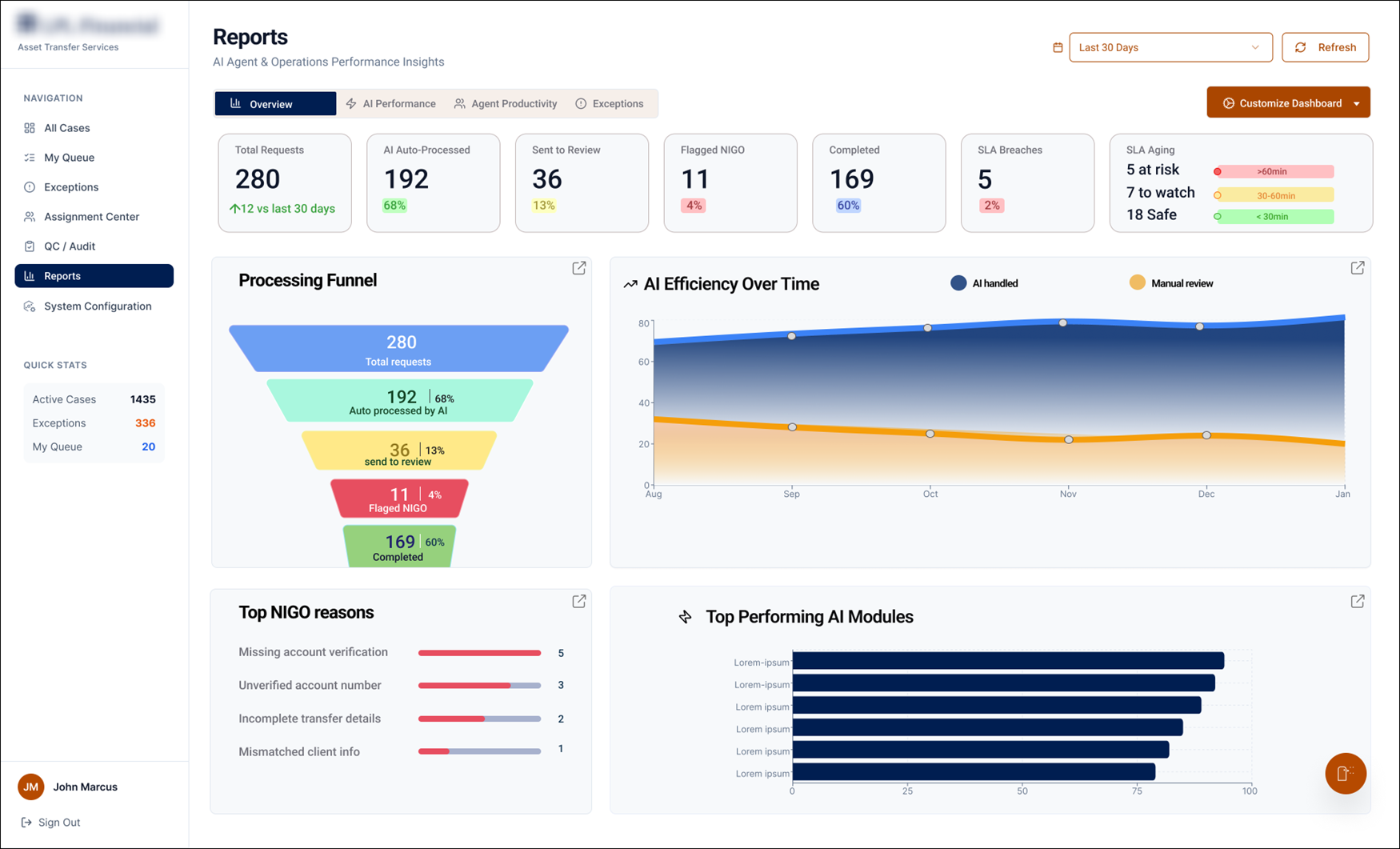
Transfer Desk reports dashboard

The redesigned Reports tab — built so a manager reads the whole operation's health in seconds.
00 — THE 30-SECOND VERSION

Built for people who don't have time to read a chart.

Asset-transfer ops run on a 3-day SLA clock. I designed a console where AI processes the routine cases, flags the risky ones, and a manager can read the health of the whole operation in seconds, not minutes.

THE ASK

My first internship project: rethink how an asset-transfer team monitors work — starting with a Reports tab nobody could read at a glance.

WHAT I MADE

An AI-assisted ops console: case queue, document validation, exception handling, smart assignment, and a glanceable insights dashboard.

WHY IT MATTERS

It moves the team from reacting to raw data to acting on clear signals — catching SLA risk before it breaches.

01 — THE CHALLENGE

Money is moving, and the clock is always running.

Every case is a real client's assets leaving an account. Teams process hundreds a day across four legacy systems, under a hard 3-day SLA — and the tools showed them data, not decisions.

When a delay surfaced, it was often too late to act. When the AI flagged a case, no one could see why.

280 transfers

move through four legacy systems every cycle — under a hard 3-day SLA, where one missed exception becomes a financial error on a real account.

01

Cognitive overload

Reports were a wall of charts. Managers had to interpret trends by hand just to find what was urgent.

02

SLA risk surfaced too late

By the time a delay showed up on a dashboard, the case was already close to breaching.

03

Fragmented tooling

Processing one transfer meant swiveling between four legacy systems to verify documents and accounts.

02 — WHO I DESIGNED FOR

One platform, two people leaning on it.

The console had to give a manager altitude and a processing agent precision — without drowning either in detail.

MA
OPERATIONS MANAGER · PRIMARY
Marcus
  • // 10+ yrs in financial operations
  • // Oversees several BPO analysts
  • // Watches SLA, workload & escalations
  • // Judged on performance targets
  • // "I need to see what's wrong in seconds, not search for it."
JH
PROCESSING AGENT · SECONDARY
Jim
  • // Processes outgoing transfers end-to-end
  • // Works across four legacy systems
  • // Clears, rejects (NIGO) or holds each case
  • // Detail-oriented & rule-driven
  • // Trusts automation only if it respects the SOP

Marcus's three questions every morning

"What needs me right now?" "Where is work getting stuck?" "Can I trust the AI's call?"
03 — THE DESIGN BETS

Four principles that turned data into decisions.

Research kept pointing to one truth: Marcus didn't need more data, he needed fewer, clearer signals. These were my guardrails.

BET 01

Signals over charts

Lead with a number and a status, not a graph someone has to interpret.

BET 02

Surface risk early

Make SLA aging and exceptions impossible to miss — before they breach.

BET 03

AI does routine, humans own calls

Auto-process the clear cases; route the rest to a person, with reasons attached.

BET 04

Earn trust with transparency

Every AI flag shows the failed check and why — no black-box rejections.

04 — THE DESIGN PROCESS

It was my first project — so I led with research.

I knew almost nothing about asset transfers on day one. So before I touched Figma, I went and sat with the people who do this work — and let what I heard shape every screen.

Discover Context inquiry Synthesize Sketch Prototype
PHASE 01

Discover

Weeks 1–3 · Apr
  • Learned the transfer lifecycle
  • Context inquiry with an ops manager
  • Mapped the four-system workflow
Walked away withDomain map + interview notes
PHASE 02

Define

Weeks 4–7 · May
  • Synthesized pains into themes
  • Built Marcus's persona
  • Framed "reduce thinking, increase action"
Walked away withPersona + design goals
PHASE 03

Sketch & Prototype

Weeks 8–12 · Jun
  • Whiteboarded the Reports tab
  • Built hi-fi screens in Figma
  • Validated with a before/after
Walked away withHi-fi prototype
PHASE 01 · CONTEXT INQUIRY

I asked a manager to walk me through his morning.

Marcus oversees a team of analysts under constant SLA pressure. Two questions told me everything about where the product was failing him.

Q · Describe your role and a typical day.

"I make sure transfers process smoothly and on time — I monitor workload, watch SLA performance, and try to spot problems before they escalate."

Q · How do you monitor performance today?

"I check volume and what's pending, whether anything's near breaching SLA, whether the team's overloaded. Right now I look at different reports and tools — it's not always clear what needs attention, so I spend more time piecing information together."

"Too much data, not enough clarity."— the line that became my design brief

PHASE 02 · WHAT I HEARD

The pains clustered around one feeling: "I'm reacting, not deciding."

Across the interview and follow-ups, the same frustrations kept surfacing — so I grouped them into the themes that drove the redesign.

01

"I don't see problems early enough"

Delays and SLA risk surfaced too late — after the window to act had closed.

02

"Hard to pinpoint where delays happen"

Nothing showed where in the pipeline work was actually getting stuck.

03

"Too much data, not enough clarity"

Charts everywhere, but no signal for what needed action right now.

04

"I want clear signals, not more charts"

Reassigning work and finding the right number meant digging through multiple views.

PHASE 03 · SKETCHING

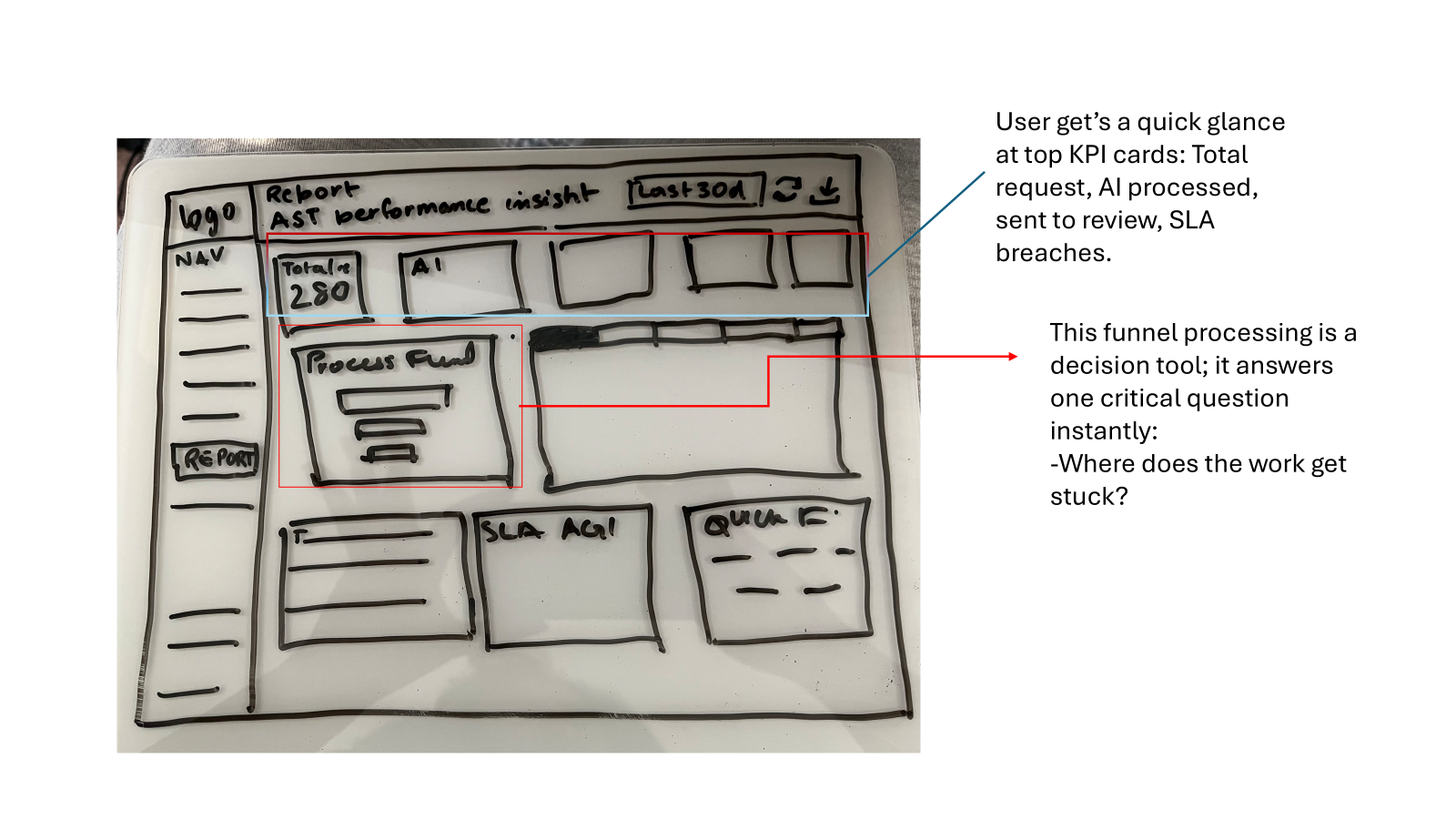
The Reports tab, on a whiteboard first.

Before pixels, I sketched the tab around a single job: answer "where does work get stuck?" in seconds. The layout fell out of that question.

Original whiteboard sketch of the Reports tab
Top KPI cards = a glance: total requests, AI-processed, sent to review, SLA breaches.
The processing funnel is a decision tool — it answers "where does work get stuck?" instantly.
PHASE 03 · VALIDATION

Before & after: how Marcus reads the tab now.

I pressure-tested the design against Marcus's real routine — the shift was from interpreting data to acting on it.

BEFORE

  • Opened the tab and scanned large charts
  • Interpreted trends manually
  • Dug to find what was urgent or failing
  • Used multiple tools to connect the dots
  • Often discovered issues late — SLA risk

AFTER

  • Glances at KPI cards — reads system health instantly
  • Checks SLA aging: safe / to-watch / at-risk
  • Scans top NIGO reasons to see what's breaking
  • Reads the AI-efficiency trend to know where to step in
  • Moves from reacting to data → acting on signals
PHASE 03 · INFORMATION ARCHITECTURE

How a case actually moves through the system.

Before hi-fi, I mapped the end-to-end case flow — where AI acts, where a human steps in, and how the whole pipeline stays observable. Every screen I designed traces back to a node here.

INTAKE

New transfer request

A client's assets are queued to move out, across one of four legacy systems.

AI · AUTOMATED

AI auto-processing

The agent reads documents and validates account data, running three check layers.

Data gatheringVerificationValidation
DECISION All AI checks pass?
✓ YES · HAPPY PATH

Ready for decision

High AI confidence — nothing flagged.

Agent confirms → IGO

Jim does a quick confirm; case is cleared.

✕ NO · EXCEPTION PATH

AI pauses & hands off

Shows exactly which check failed and why.

Human review → IGO / NIGO

Jim resolves the exception, or marks Not In Good Order.

ROUTING LAYER

Assignment Center

Distributes and reassigns cases across the team — by SLA, workload and AI suggestion.

OBSERVABILITY LAYER · MARCUS

Reports & Insights

Watches the whole pipeline at a glance — SLA aging, the processing funnel, and top NIGO reasons.

05 — THE SOLUTION

The console, end to end.

From the agent clearing a single case to the manager reading the whole room — four moments that show the system working.

01

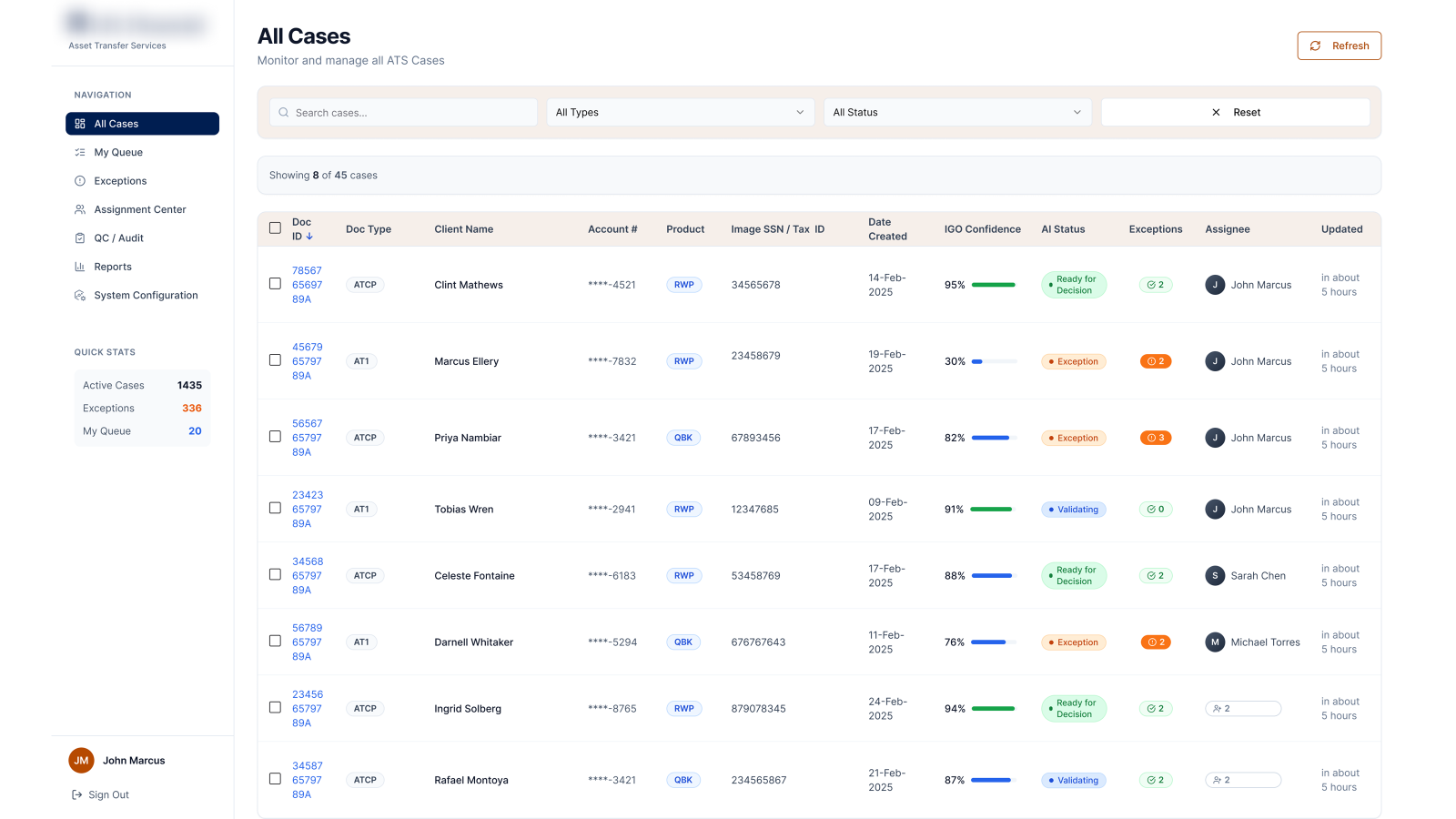
A queue you can triage at a glance

Every case leads with AI confidence, status and open exceptions — so an agent knows where to start before opening anything.

transfer-desk / all-cases
All Cases queue with AI confidence and status
IGO confidenceAI statusexceptions
02

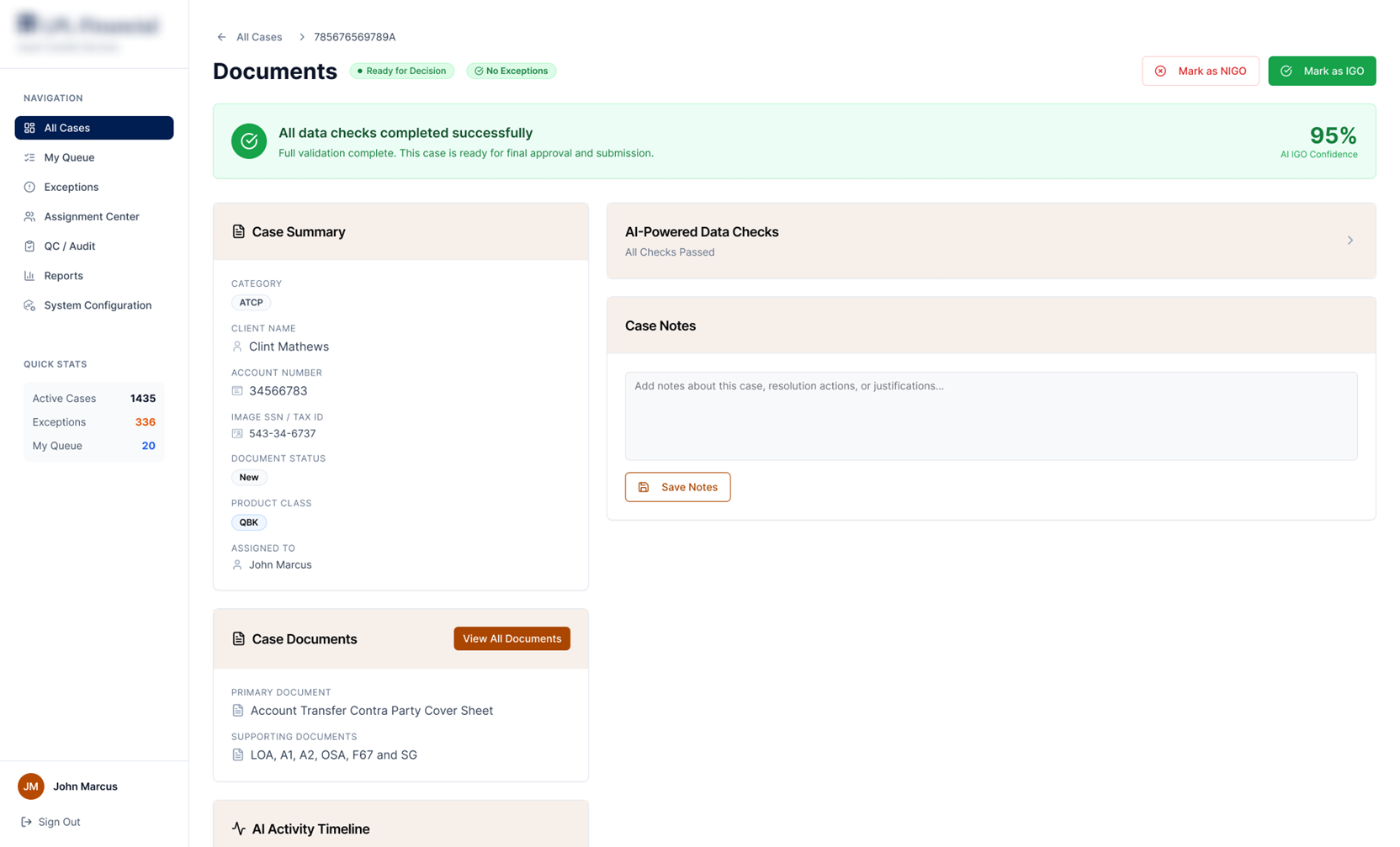
AI clears the clean cases

When every check passes, the case is marked ready for decision at high confidence. The agent confirms instead of re-deriving the work.

transfer-desk / case · ready
Case detail, all checks passed, 95% confidence
03

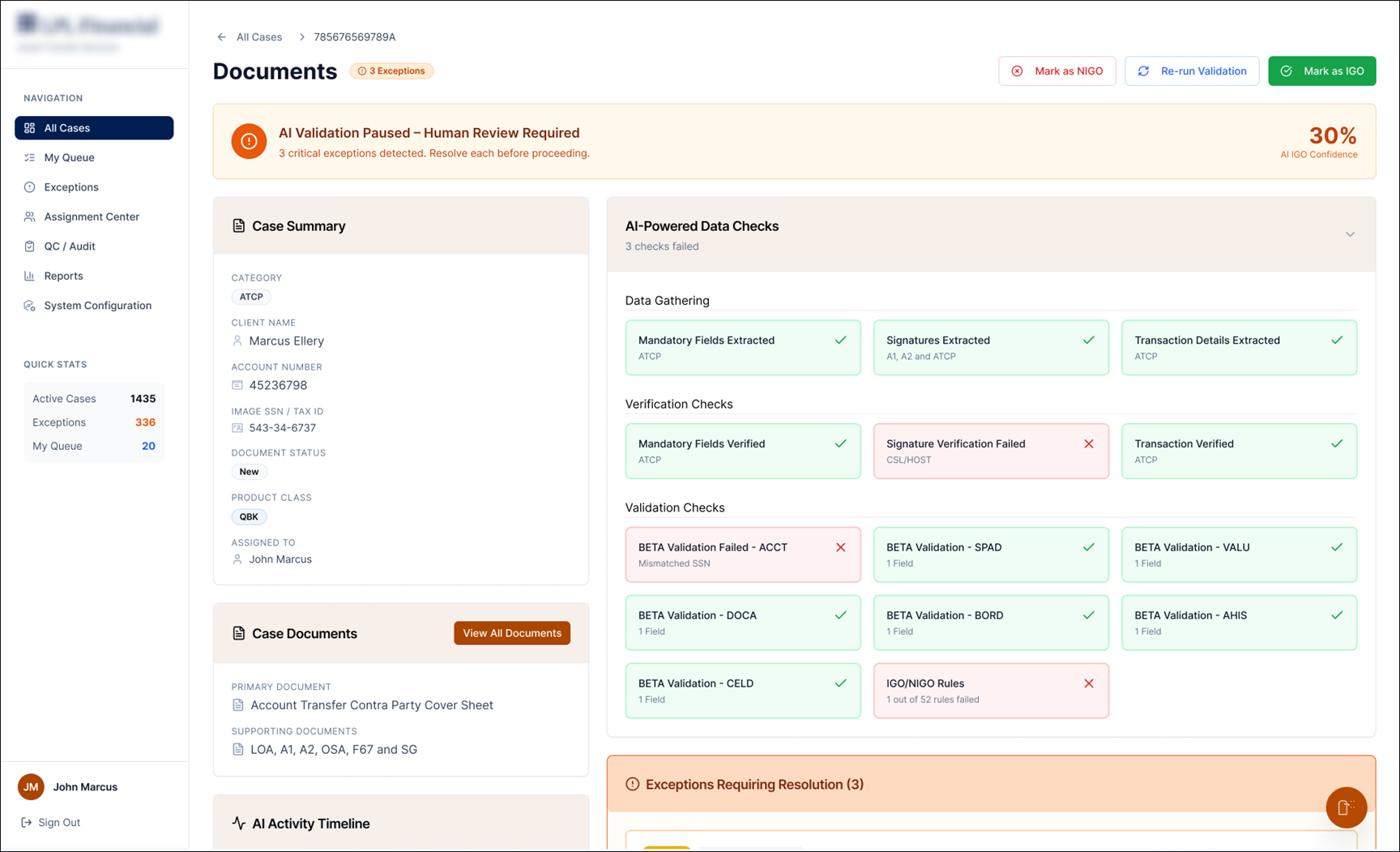
…and stops when something's off

When checks fail, AI pauses and hands off to a human — showing exactly which verification failed and why. No black-box rejection.

transfer-desk / case · exceptions
AI validation paused, human review required, failed checks
data gatheringverificationvalidation
04

The Reports tab, rebuilt for a glance

KPI cards lead with a number and a status. A processing funnel answers "where does work get stuck?", and SLA-aging bands flag risk before it breaches.

transfer-desk / reports
Reports dashboard with KPIs, processing funnel and SLA aging
KPI glanceprocessing funnelSLA aging
06 — THE OUTCOME

From reacting to data, to acting on signals.

The redesign gave the team a console that reads like a decision, not a database — and gave me my first taste of shipping research-driven design.

↓ DECISION TIME

Seconds, not minutes

KPI cards plus status let a manager read system health at a glance instead of interpreting charts.

↑ RISK CAUGHT EARLY

SLA before breach

SLA-aging bands surface at-risk cases while there's still time to act on them.

→ TRUST

Explainable AI

Every flag shows the failed check, so agents act on the AI's verdict with confidence.

07 — WHAT I LEARNED

My first project taught me that clarity is a design decision.

Coming in, I wanted to show range — more charts, more views, more proof I'd worked hard. Research flipped that instinct. Marcus didn't need more data; he needed fewer, clearer signals. The most valuable thing I added to that Reports tab was restraint.

If I picked it up again, I'd usability-test the funnel with real managers and design the empty and error states — the moments a dashboard usually forgets, and where trust is quietly won or lost.